Why Two-Way Communication Matters for Senior Safety
When families begin looking into an elderly wearable alarm, the first features they notice are usually fall detection and an SOS button. Those are essential, but there is another capability that often makes the real difference in daily life: two-way communication. A device that can both send an alert and let someone speak directly with the person wearing it changes how families stay connected and how quickly they can respond to a situation.
This article explains what two-way communication means in a wearable alarm, how it works in practice, and why it matters for older adults who want to live independently while staying safe.
What Two-Way Communication Adds to a Wearable Alarm
A basic personal alarm sends a signal when the wearer presses a button. That is one-way communication. The alarm goes off, a contact gets notified, and someone has to go and check. Two-way communication turns that into a conversation. The wearer can speak directly to a family member or a monitoring contact through the device itself, and the contact can reply through the same channel.
This is not a phone call in the usual sense. The wearable device has a speaker and a microphone, and it connects through a mobile network or Wi-Fi to a smartphone app. When the wearer presses the SOS button, the device opens a voice channel. The family member who gets the alert can hear what is happening and talk back. That small shift - from a one-way alarm to a two-way link - changes the whole dynamic of staying safe at home.
How Two-Way Communication Works in Practice
The process is simple from the user's side. The older adult wears the device, usually on a lanyard or clipped to a belt. If they need help, they press the SOS button. The device then connects to a paired smartphone app on a family member's phone. That family member can hear the person speak and can respond directly through the app. The conversation happens in real time, without the older adult needing to hold a phone or remember a number.

For example, someone might feel unsteady and press the button. The family member hears them say "I just felt dizzy" and can ask "Are you sitting down? Should I call a neighbour?" The answer comes back immediately. That kind of back-and-forth is not possible with a simple alarm that only sends a notification.
Some devices also let the family member initiate a check-in. They can call the device, and the wearer can answer by pressing the button. This is useful for a quick "How are you doing this morning?" without waiting for the person to call. It turns the device into a tool for regular contact, not just emergencies.
Why It Matters for Senior Safety
Reducing False Alarms
One of the frustrations with any alarm system is the false alert. A fall detection sensor can trigger when someone drops a bag or sits down hard. An SOS button might get pressed by accident. With two-way communication, the family member can quickly ask "Are you okay?" and hear the answer. If it is a false alarm, they know immediately. If there is no answer, they know to take the alert seriously. That saves time, worry, and unnecessary trips.
Building Confidence for the Older Adult
Knowing that someone can talk back through the device makes the elderly wearable alarm feel less like a medical monitor and more like a connection. The wearer is not just sending a distress signal into the void. They are speaking to a real person who will respond. That can reduce anxiety about being alone and make the device something they actually want to wear.
Supporting Family Check-Ins
Two-way voice makes family check-in a natural part of the day. A daughter working in another city can call her father's device at lunchtime, say hello, and hear about his morning. He does not need to answer a phone or remember to call her. The check-in happens through the device he already wears. That kind of regular contact helps families notice changes in a person's daily routine - a quieter voice, a confused answer, or a missed check-in - before a crisis develops.
Two-Way Communication and Independent Living
For many older adults, the goal is not constant supervision but the ability to live in their own home with a safety net. An elderly wearable alarm with two-way communication provides exactly that. The person can go about their day, knowing that if something goes wrong, they can talk to someone who cares. The family member can stay in touch without being intrusive.
This is especially valuable in senior housing or retirement villages, where staff may not be on site around the clock. A resident who feels unwell at night can press the button and speak directly to a family member or a designated contact. That contact can assess the situation and decide the best response, without needing to call a separate monitoring centre or wait for someone to arrive.
It is also useful for older adults who live alone. The device gives them a way to reach help that does not require them to find a phone, remember a number, or unlock a door. They just press one button and speak. The person on the other end can hear their voice, judge their state, and act accordingly.

What to Look for in a Device with Two-Way Communication
Not every wearable alarm handles two-way communication the same way. Some things to consider:
- Does the device use a cellular connection or Wi-Fi? Cellular usually works over a wider range, including outdoors. Wi-Fi may have dead spots in a home.
- How long does the battery last? A device that needs charging every day is less likely to be worn consistently.
- Is the voice quality clear? The microphone and speaker need to work well enough for a conversation, not just a shout.
- Can the family member initiate a call, or only respond to an SOS? The ability to call in is useful for daily check-ins.
- Does the device work with multiple family members? Some systems allow several contacts to be notified and to join the conversation.
The device from familyr.co.nz includes two-way communication as part of its design, linking the wearer directly to family members through an app. That fits the pattern many families are looking for: a simple device that lets them stay in touch and respond quickly without a monthly subscription fee.
The Human Side of the Technology
Two-way communication shifts the elderly wearable alarm from being a passive safety device to an active tool for connection. It allows families to hear each other's voices, ask questions, and make decisions together. That matters because the real goal of any safety system is not just to detect emergencies but to prevent them from becoming crises. A fall that happens while someone is alone and unable to call for help is very different from a fall where the person can speak to a family member within seconds and get reassurance while help is on the way.
The same technology also supports the everyday moments that keep families close. A quick call to say goodnight, a check-in after a doctor's appointment, a reminder to take medication - these small interactions add up. They build trust and reduce the loneliness that can affect older adults living alone.
Practical Considerations for Families
Introducing a wearable device to an older relative works best when the person understands what it does for them. Explain that the device lets them talk to you without needing a phone. Show them how to press the SOS button and what happens next. Let them practice in a calm moment so they feel confident using it.
It is also worth testing the device in different parts of the home to make sure the voice connection is clear. A hallway or a bedroom may have different acoustics. If the device uses Wi-Fi, check that the signal reaches the areas where the person spends most of their time.
Families should also agree on what happens when an alert comes through. Who responds first? What if that person is busy? Having a clear plan reduces stress when an actual emergency occurs. The two-way communication helps with this too, because the first responder can quickly assess whether the situation needs more help or just a reassuring voice.
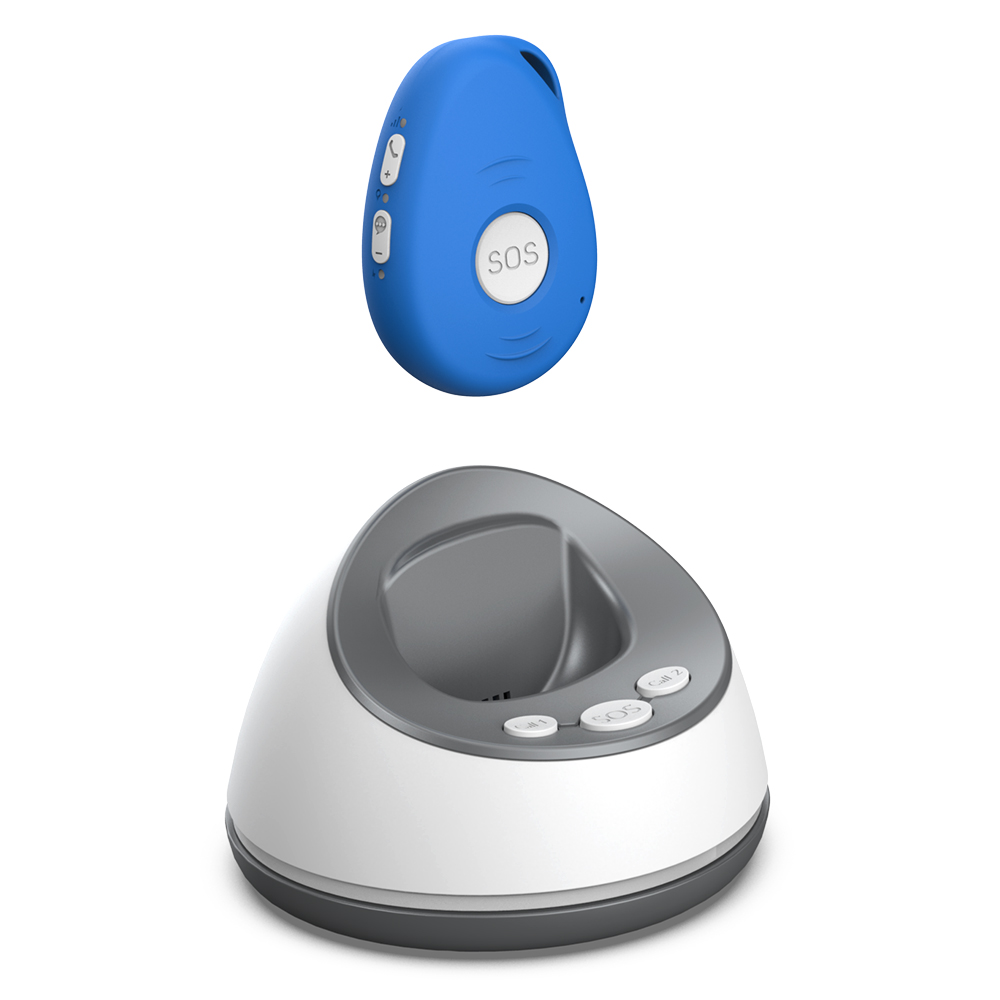
For families in New Zealand, the option from familyr.co.nz provides this two-way link without ongoing costs, which removes a common barrier to adoption. When families do not have to worry about monthly fees, they can focus on making the device part of their regular routine.
Looking Ahead
As the population ages and more older adults choose to stay in their own homes, the tools that support independent living will keep evolving. Two-way communication in a wearable alarm is a step beyond simple monitoring. It turns a device into a bridge between generations, making it easier for families to stay connected and respond quickly when it matters most.
The best device is the one that gets worn and used. Two-way communication helps make that happen by giving the wearer a voice and the family a direct line to hear it.